
Google Ads Pricing – PAY-PER-CLICK

June 7, 2021

How Much Does a Click Cost? … It Depends!
Google Ads & AI SEO Services
Google Ads Management Services
Search Engine Optimization Services
AI Optimization Services
GEO services
Google Ads Management Pricing
AI Marketing

OK … the title of this article captured your attention … only to find out that there is no one-size-fits-all answer to the question of Google Ads pricing which then determines your cost. Stay with us and all will quickly become clear, plus you’ll learn how to budget and manage your Google Ads campaigns.


You are either a current Google Ads customer or considering a “toe-in-the-water”. There’s plenty of valuable nuggets for both business owner/manager profiles, so be sure to read on. As a “teaser” … Google claims the average Google Ads advertiser reaps an ROI of two dollars for every dollar invested. That’s potentially a double-your-money impact on your business!


Note: If you’re running your own Google Ads, consider our FREE Google Ads Audit.


What Is Google Ads?

Google Ads is Google’s pay-per-click advertising platform. As an advertiser, you can create advertisements and determine how much you’re willing to pay every time an internet seeker for your offerings clicks on your ad.


Since the scope of this article is Google Ads pricing, the operative words to focus on are “pay-per-click”.  The “click” refers to when a Google searcher clicks on your ad and visits your website.
Note: You only pay when your ad triggers a visit to your website.


The price of each click is determined by an auction process based on keywords and phrases featured in your ad. Many companies bidding for the same phrase drives the cost per click up … with the opposite effect when only a few companies bid.


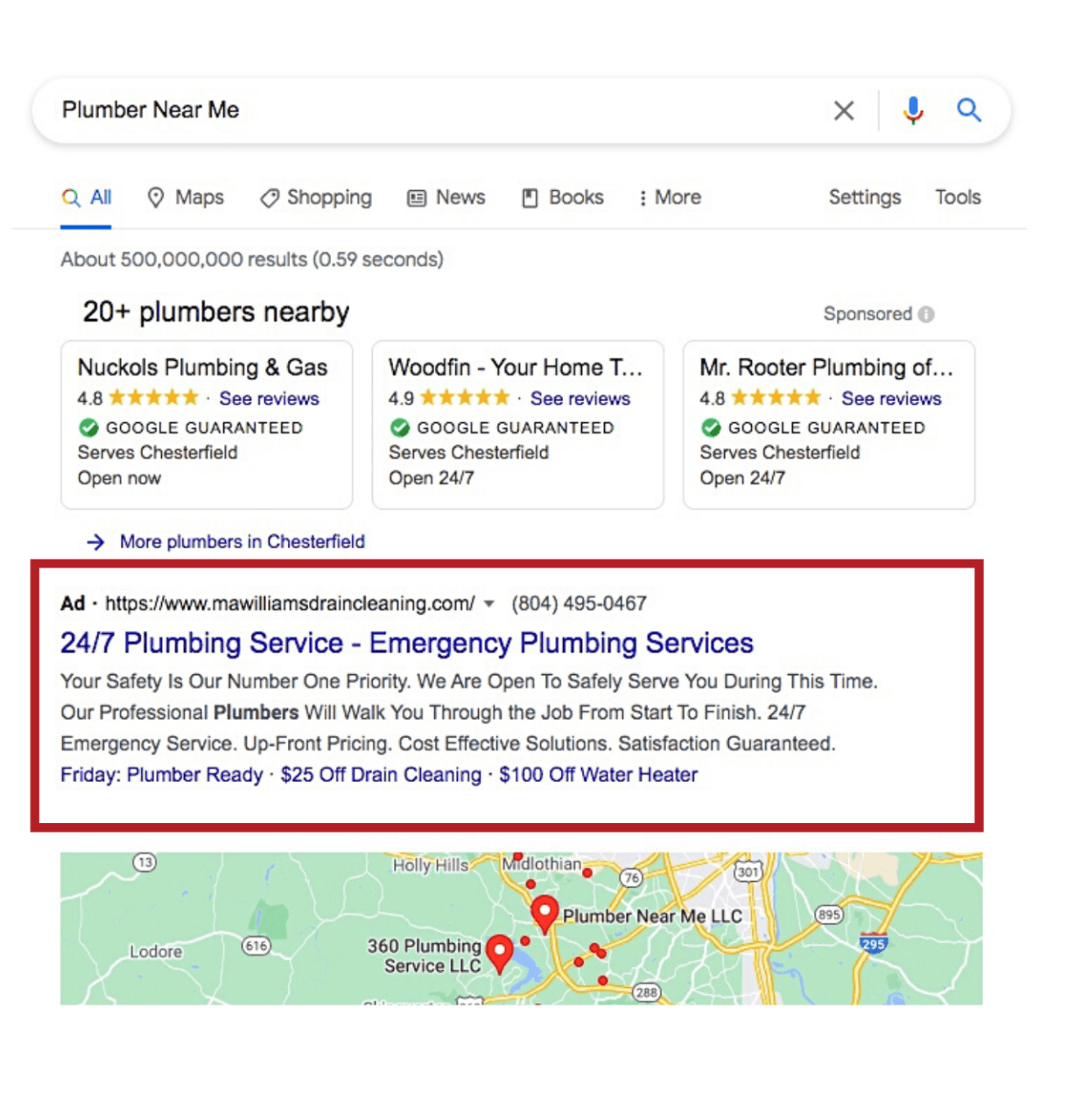
Google’s auction system reflects real-time pricing, so depending on the amount of bidding activity your cost per click may vary virtually moment to moment. When your bid for a keyword is higher than other advertisers, you win … your ad will appear at the top of the search results and look similar to this.
Google Ads & AI SEO Services
Google Ads Management Services
Search Engine Optimization Services
AI Optimization Services
GEO services
Google Ads Management Pricing
AI Marketing
Important! You’re the boss when it comes to budget! You can set daily, monthly and campaign budget limits.


Now a word about Strategy. Ultimately, the effectiveness of your pay-per-click advertising will be driven by your strategic plan to achieve your advertising objectives. To use an aeronautical metaphor, your attention must be to ensure all your advertising aircraft are flying in formation.


You’ll have a good strategy when you coordinate:

  • Targeted set of keywords and phrases;
  • Well-written ads
  • Functional, up-to-date website.


Any disconnect in these three critical factors will negatively affect your Google Ads ROI.


More on all of this in a bit.


The 6 Drivers of Google Ads Pricing

There are 5 Drivers that will determine your experience with both Google Ads pricing as well as the effectiveness of your pay-per-click advertising. Here’s a list of the Drivers … followed by more definition of each.

  1. Industry
  2. For Local Businesses - Location
  3. Customer Lifecycle
  4. Current Trends
  5. Keywords
  6. Google Ads Auction

Industry

Your industry is the primary factor that will determine your Google Ads cost. Industries with advertisers that are highly competitive in choosing keywords will drive up the cost per click for all advertisers. Depending on your industry, location, and competition, keywords can cost as low as a few cents … or as much as a couple hundred dollars.


Among the most competitive industries are law, accounting, insurance and finance. While some keywords may cost $100 or more per click, the conversion rate of website visitors to customers is dramatic … with significant generation of revenue. In contrast, less competitive industries will cost less and generate substantially less income for each new customer.


So, if your industry is one requiring you to compete for high value keywords, you’ll spend more per click … and likely be rewarded with the potential for an impressive ROI.


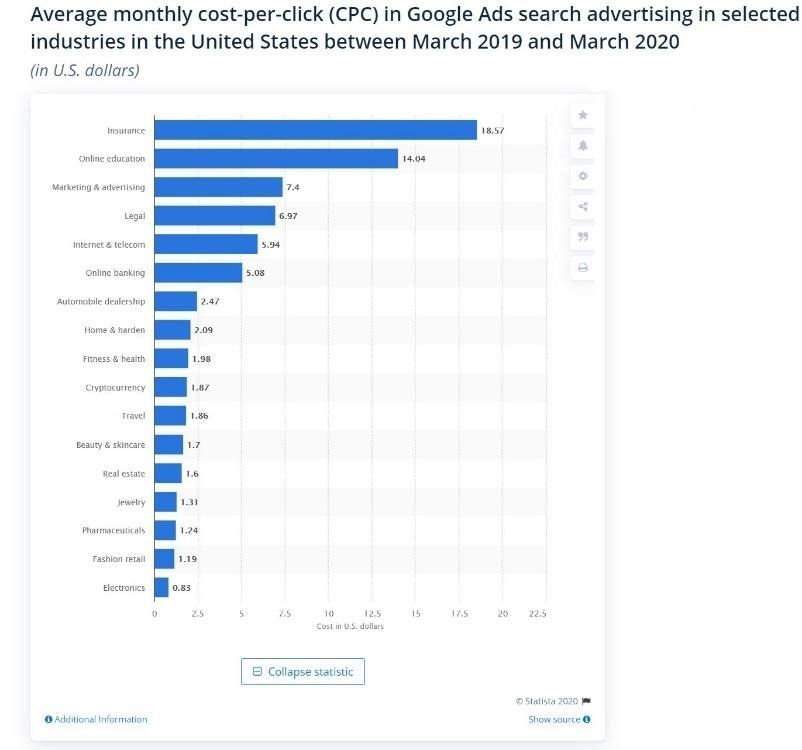
Take a look at cost-per-click (CPC) industry differences during 2020.
Google Ads & AI SEO Services
Google Ads Management Services
Search Engine Optimization Services
AI Optimization Services
GEO services
Google Ads Management Pricing
AI Marketing
Average Google Ads CPCs by industry (search only, excludes display and YouTube ads):


Compare the average CPC for the top 3:

  • Insurance: $18.57
  • Online education: $14.04
  • Marketing and advertising: $7.40


With the bottom 3:

  • Pharmaceuticals: $1.24
  • Fashion retail: $1.19
  • Electronics: $0.83

The differences reflect the industry level of competitiveness and financial payoff of conversions.

For Local Businesses – Location

Local Businesses are those seeking to attract prime customers within a reasonable driving distance of their company’s location, say 20 miles. That commercial focus on a concentrated geographical location may prompt variations in the per-click cost of Google Ads. Consider two scenarios.


In an ideal world, your business would be the only one of its kind in your preferred marketplace. Given that unlikely scenario, you may be the only Google Ads advertiser of your product/service offerings. So, in the absence of competitive advertisers, you would enjoy very affordable cost-per-clicks.


Now for a more realistic scenario … say your world is populated with 100 competitors all advertising within 10 miles of your site. Those circumstances are likely to trigger fierce competition for your choices in keywords. And just as in the Industry competition discussed above, your cost-per-click trajectory will be driven skyward … often with significant velocity.


Click here to learn how Local Businesses can effectively compete in a crowded marketplace.


Customer Lifecycle

An important revelation from the industry analysis above is the nature of the lifecycle of your customer. Said another way, the bigger ticket sales usually require a longer decision-making process. That means you must remain top-of-mind to ensure that you are the vendor of choice when a buying decision is to be made.


Be prepared to expect multiple visits to your website, downloading information, participation in a webinar or requesting an online chat. This underscores the importance of your strategic plan.


You’ll have a good strategy when you coordinate:

  • Targeted set of keywords and phrases;
  • Well-written ads
  • Functional, up-to-date website.


Any disconnect in these three critical factors will negatively affect your Google Ads ROI.


Current Trends

Professional marketers agree, “The More Things Change … The More They Keep Changing”! And that’s particularly critical when it comes to staying on top of the keyword searches most likely to drive traffic and deliver qualified buyers to your website.


Google offers a free tool that takes the guesswork out of determining regional differences in phrase preference, as well as keywords that are growing in popularity. You can view whether a trend is on the rise or declining. You can also find demographic insights, related topics, and related queries to help you better understand the search trends.


An added plus is your ability to compare how keyword volume may fluctuate over a given timeframe … a measure of the search term’s competitiveness. That is particularly valuable to discover event-triggered spikes like seasonality of demand … as well as unpredictable changes in consumer behavior driven by such things as the current pandemic.


Understanding and mastering its use will add significant power to you maintaining and increasing your visibility when the buying public searches for what you deliver.


Keywords

Google Ads pricing is primarily influenced by your commercial offering coupled with industry competition for your preferred keywords. Overall, the average Google Ads CPC is $1 to $2. However, as discussed above, in highly competitive markets clicks bear a “sportier” price tag. Take a look at this visual representation of the most expensive keywords in Google Ads.

Google Ads & AI SEO Services
Google Ads Management Services
Search Engine Optimization Services
AI Optimization Services
GEO services
Google Ads Management Pricing
AI Marketing

Here’s a list ranking the most expensive keyword categories in Google Ads, and the average cost-per-click of each. It’s worth noting that these are keyword categories, not actual keywords themselves—in some cases, the CPCs of keywords within each category may be higher than the averages stated:


  1. Insurance - $54.91
  2. Loans - $44.28
  3. Mortgage - $47.12
  4. Attorney - $47.07
  5. Credit - $36.06
  6. Lawyer - $42.51
  7. Donate - $42.02
  8. Degree - $40.61
  9. Hosting - $31.91
  10. Claim - $45.51
  11. Conference call - $42.05
  12. Trading - $33.19
  13. Software - $35.29
  14. Recovery - $42.03
  15. Transfer - $29.86


Take a look at the following two examples of the power in knowing what keyword is likely to deliver superior results … web developer over web designer … lawn care near me trumps landscapers near me.

OK … now for a more in-depth look … first click here … then read and  follow-up by clicking here.


Google Ads Auction

OK … this is not actually how a Google Ads auction is conducted, but worth a 2-minute break from learning about Google Ads pricing and cost per click.


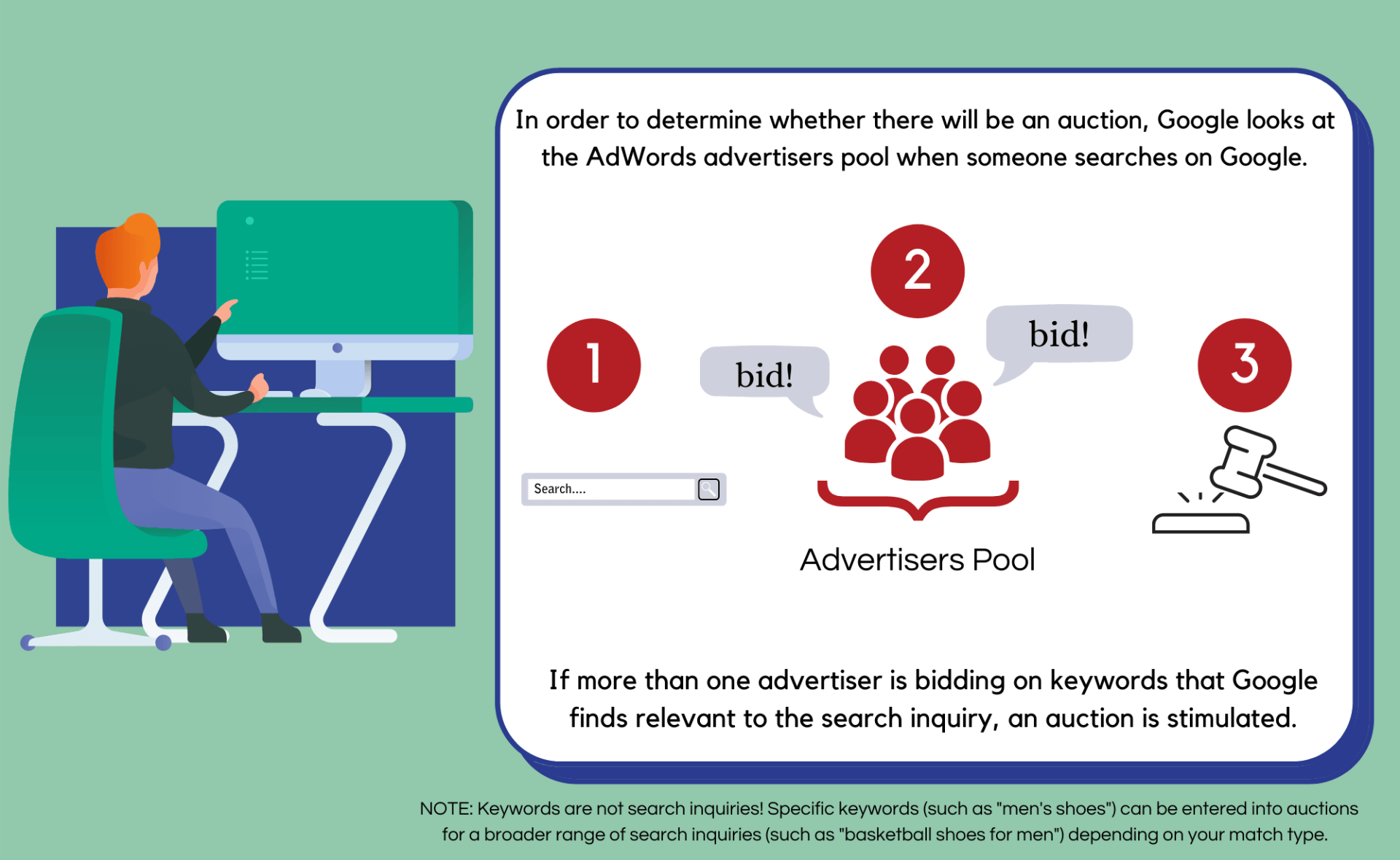
Now back to work! As the word “auction” implies, Google Ads functions essentially like an in-person auction. Here’s a summary of the process.


When an internet searcher types a word or phrase into the Google search bar, Google automatically reviews the entry to see if the query includes keywords. If “yes”, it checks to see if Google Ads advertisers are actively bidding on one or more of the keywords. The presence of competing bidders will initiate the ad auction.

Google Ads & AI SEO Services
Google Ads Management Services
Search Engine Optimization Services
AI Optimization Services
GEO services
Google Ads Management Pricing
AI Marketing

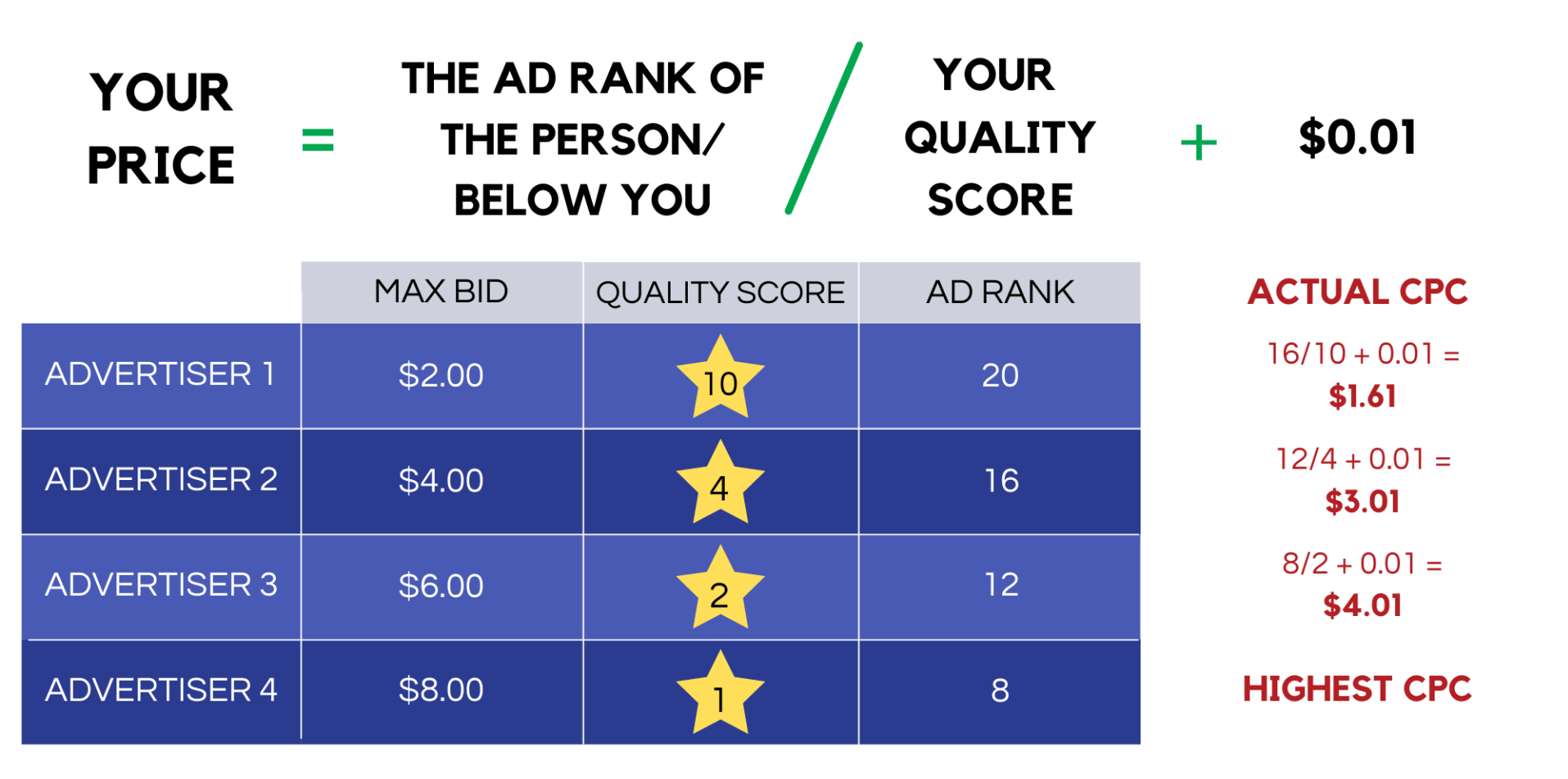
The next step is a calculation by Google that rank-orders the contending ads to fix the Ad Rank of each. That will determine if and at what level your ad will be placed on the paid results page. See the graphic below for the calculation that governs your Ad Rank position.

Google Ads & AI SEO Services
Google Ads Management Services
Search Engine Optimization Services
AI Optimization Services
GEO services
Google Ads Management Pricing
AI Marketing


Based on your Quality Score and Ad Rand, Google determines how much you’ll pay each time someone clicks on one of your ads. Hang in for one more calculation routine.
Google Ads & AI SEO Services
Google Ads Management Services
Search Engine Optimization Services
AI Optimization Services
GEO services
Google Ads Management Pricing
AI Marketing

Interesting to Note: In this instance Advertiser 1 pays less than Advertiser 4 plus enjoys a higher Ad Rank position due to a superior Quality Score. Thanks to the Google Ads auction algorithm, small-budget businesses may advertise just as effectively on Google as deep-pockets companies.


Without “getting into the weeds”, several other variables have some impact on your Ad Rank and ad spend. That said, your CPC Bid and Quality Score are the primary drivers.


TAKEAWAYS

Here are the key points to keep in mind:

  • Google Ads Pricing fluctuates from industry to industry.
  • There are 5 Drivers of Google Ads Pricing: 1) Industry, 2) Customer Lifecycle, 3) Current Trends, 4) Keywords, 5) Google Ads Auction.
  • Choice of keywords are critical to maximize your ROI.


Next Steps

Clearly, you must at least consider Google Ads as a cornerstone of your marketing spend. It’s a proven platform for businesses of any size and scope encompassing virtually all industry groups. Google claims the average Google Ads advertiser reaps an ROI of two dollars for every dollar invested. That’s a double-your-money impact on your business!


There are credible reports of multiples of this level of profitability … so what’s not to like? Worst case you may have to test your ad content to fine-tune a successful campaign. That said, remember, you’re the boss when it comes to budget! You can set daily, monthly and campaign budget limits.


What Will You Do?

Now your choices are do-it-yourself or invest in third-party expertise with a proven track-record of success. When it comes to DIY, it’s likely you are already wearing several hats as a business owner … adding yet another marketing responsibility is probably not a workable option.


Having read this far, you are either a current Google Ads customer or considering “testing the waters”.


If you’re running your own Google Ads, consider our FREE Google Ads Audit

Third Marble Marketing - Google Ads & SEO Tips, Tricks and Case Studies
Google Ads & AI SEO Services
Google Ads Management Services
Search Engine Optimization Services
AI Optimization Services
GEO services
Google Ads Management Pricing
AI Marketing
By Alex Huibsch • October 2, 2026
What is AI Search Optimization? AI Search Optimization is the practice of tuning and structuring your website’s content so tools like Google AI Overviews, ChatGPT, Gemini, Grok, Perplexity, and others can index your pages and actively quote, cite, and recommend your business when prospective customers ask for local help. Why SEO is Moving Beyond Just "Rankings" For over 15 years, our mission at Third Marble Marketing has been to provide straightforward, affordable search engine optimization that helps growing businesses get found online. While our mission hasn't changed, how people search for local services certainly has. Instead of scrolling through pages of Google blue links, modern consumers are now typing questions into ChatGPT or reading the instant AI summary box at the top of Google. Rather than picking from ten individual links, they look at the two or three local businesses that the AI directly recommends. If your website isn't set up for AI scrapers to easily read, verify, and pull information from, your business risks becoming invisible to this growing crowd of searchers. That’s why we’ve upgraded our SEO packages to ensure your business gets recommended no matter how or where people search. Real-World Proof: How First-Hand Experience Wins AI Recommendations AI search tools hate generic marketing fluff. They look for real, verified, first-hand knowledge. We recently applied this exact approach for a client running an auto glass shop with multiple locations. Their locations were buried deep in traditional search results, making them completely invisible in AI-generated answer boxes. To fix this, we sat down with the business owner, extracted his actual industry expertise, and wrote fresh, helpful content. We then reformatted the text with clear, direct summary blocks and structured headers that AI scrapers love. The result? The client's search visibility surged, slashing their average position from 48.1 down to 21.3. Better yet, the owner reported that new leads were specifically calling and saying, "I found your shop on ChatGPT." Inside Third Marble’s Upgraded AI SEO Packages Whether you operate in a quiet niche market or fight dozens of aggressive local competitors, our flat-rate plans scale to match your local landscape: The Basic SEO Package ($499/month) Built for niche businesses in low-competition markets with fewer than 30 local competitors and up to $1M in revenue. This plan focuses on core technical indexing, optimizing up to 15 pages per month with meta titles, descriptions, heading tags, and image alt text. It includes 6 low Domain Authority (DA) backlinks per quarter and core directory setup to ensure AI bots index your brand without errors. The Enhanced AI SEO Package ($1,299/month) Designed for crowded spaces with 20 to 100 local competitors and $1M to $5M in revenue. This plan accelerates active AI extraction across ChatGPT, Gemini, and Google AI summaries. It covers technical edits on up to 30 pages per month, 21 quarterly backlinks (3 Medium DA and 18 Low DA), GBP category strategy, and quarterly strategy calls. Crucially, it introduces Quarterly AI Content Writing , delivering 1,500 words of clear, Q&A-structured copy engineered specifically for AI scrapers every three months. The Premier AI SEO Package ($3,499/month) Our most aggressive framework for multi-location enterprises or high-competition spaces facing 50+ fierce competitors and holding $2M+ in revenue. Built for complete market dominance across all AI search platforms, this plan covers technical optimizations on up to 50 pages per month and builds 27 quarterly backlinks (3 High DA, 6 Medium DA, and 18 Low DA). Instead of waiting every quarter, our team delivers Monthly AI Content Writing (1,500 words of conversational, Q&A copy every month) alongside continuous citation cleanup and dedicated monthly strategy meetings. The 4 Pillars of Our AI Optimization Process 1. Direct Answer Formatting AI models prefer content that answers questions cleanly in plain English. We place concise, 20-to-30-word "Answer Capsules" near the top of key pages so AI crawlers can easily quote your business. 2. Clean HTML & Schema Markup We implement technical schema (Organization, Article, and Person markup) behind the scenes, while making sure visible page elements (like headings

,

, bullet points, pricing tables, etc.) are effortless for LLMs to scan. 3. Human Verification & Real Expertise To prevent misinformation or generic advice, our team interviews clients directly. Every tip, process step, or service description we publish is verified by an actual business owner to satisfy Google's E-E-A-T standards. 4. Multi-Platform Monitoring Rankings aren't just measured on Google anymore. We track your footprint using Google Search Console alongside tools that monitor how your brand appears across ChatGPT, Gemini, Grok, and Perplexity. Is Traditional SEO Dead? No, traditional SEO is alive and well. In fact, AI search engines rely almost entirely on Google's core ranking systems (domain authority, site speed, and technical health) to choose which businesses to trust and quote. If your website isn't technically sound or properly indexed, AI engines won't find or quote it. Our AI Optimization builds directly on top of traditional SEO to ensure you capture both standard search traffic and modern AI recommendations. Ready to Claim Your Share of AI Search? Search is changing fast, but getting your business in front of local customers doesn't have to be complicated or overpriced. At Third Marble Marketing, we back our process-driven AI SEO with flat-rate pricing and no long-term contracts. Schedule a quick call with our team to pick the right plan for your market.


Google Ads & AI SEO Services
Google Ads Management Services
Search Engine Optimization Services
AI Optimization Services
GEO services
Google Ads Management Pricing
AI Marketing
By Liz Morrow • September 24, 2026
If phone calls are an important source of leads for your business, you want your Google Ads conversion tracking to accurately reflect those calls. One issue we sometimes see is FaceTime being counted as a conversion in place of (or alongside) a traditional phone call. It may seem like a harmless technical detail, but it can create misleading data and potentially affect how your Google Ads campaigns optimize. Here’s what every business owner needs to know. Q: What’s wrong with having FaceTime set up as a conversion? A: FaceTime isn't necessarily the customer action you are trying to measure. If your goal is to generate phone calls from potential customers, your conversion action should represent that behavior as accurately as possible. A FaceTime interaction is fundamentally different from a traditional phone call. Depending on the visitor's device and how your website's phone number links are configured, a user clicking a link may simply trigger a FaceTime app prompt rather than completing a direct phone call. The important question to ask is: Does this conversion represent an action that actually results in business for you? If the answer is no (or if you’re just not sure), it’s time to take a closer look at your conversion setup. Q: But isn't FaceTime still a phone call? A: Technically, FaceTime can involve a call, but that doesn't make it a reliable substitute for business call tracking. When you are evaluating your Google Ads performance, you want your conversion data to answer a very specific question: "Did someone take an action that could reasonably result in a new customer or client?" If you are trying to measure actual phone leads, tracking the explicit phone-call action gives you much more meaningful information than simply counting every time a device initiates a FaceTime-related interaction. Q: Why does this matter for Google Ads optimization? A: Because your conversion data tells Google’s automated bidding algorithms what to look for. Google Ads doesn't just report conversions for your records. It uses Smart Bidding and machine learning to decide who sees your ads next. If Google is told that a FaceTime prompt is a valuable conversion, its algorithm will actively seek out more users who are likely to perform that exact interaction. If those interactions rarely turn into paying clients, your campaign will start optimizing toward empty clicks rather than genuine business leads. Your conversion tracking needs to reflect real business value, not just casual website activity. Q: What should I be tracking instead? A: Track the specific phone-call actions that represent a true potential customer reaching out. Depending on how your business operates and how your website is built, accurate call tracking usually includes: Calls from Ads: Tracking phone calls initiated directly from call extensions or call-only ads. Website Call Conversions: Using Google forwarding numbers or dedicated dynamic call-tracking software to record when a website visitor actually dials your phone number. The key is knowing precisely what each p r imary conversion action represents in your account. Q: How can I tell if FaceTime is being counted as a conversion in my account? A: Review your Conversion Actions menu directly inside Google Ads. Don't assume your account is tracking properly just because it was set up by a professional in the past. Open your conversion setup and evaluate the following: What exact trigger is being counted? (e.g., a click on a tel: link vs. a completed call duration) Is FaceTime included or separated? Are phone calls being tracked accurately? Is Google optimizing toward actions that drive real revenue? If you're not sure what you're looking at when reviewing your conversion tags, it’s always worth having a Google Ads specialist perform a thorough conversion audit. Getting Your Conversion Strategy Right Don't let your Google Ads account optimize for something simply because it’s easy to track. Your conversion actions should reflect customer behaviors that carry real monetary value to your business. If phone calls generate revenue for you, make sure you are accurately tracking phone calls, not just device interactions that look like calls in a reporting dashboard. Good advertising starts with good data. And good data starts with tracking the right things.
Google Ads & AI SEO Services
Google Ads Management Services
Search Engine Optimization Services
AI Optimization Services
GEO services
Google Ads Management Pricing
AI Marketing
By Ryan Brunt • September 17, 2026
The world of AI can be a confusing one. If you own a small business, it can be difficult to know where to start. After all, there are a myriad of factors involved in your small business’s search results, and AI search engines all interact with these factors in different ways. It's easy to get overwhelmed, which is why we're here to help you and your business. Below is a Small Business AI Search Readiness checklist to guide you through everything you need to know. FAQ #1: Do AI Engines Look At My Google Business Profile? Yes. When it comes to how your business ranks on Google, few things are as crucial as your Google Business Profile. This means it is hugely important for how your business ranks with AI engines. FAQ #2: How Should I Optimize My Google Business Profile? Completeness : Your Google Business Profile must be complete; it may be tedious, but completing all the setup steps given by Google proves your business’ legitimacy. Accuracy : Ensure that your business information is consistent between your Google Business Profile and your website. This includes your business name, address, phone number, hours, as well as your services. This helps Google see your business entity consistency, as your information is consistent in multiple places around the web. We'll touch on more of this later. Activity : Make sure that you're active on your business profile (we can't stress this enough). Consistently posting updates and uploading photos and videos, as well as responding to reviews, is a great way to show Google that your business is active and legitimate. FAQ #3: What Is Entity Consistency? The way that AI engines read your website is completely different from the way that traditional search engines work. AI engines analyze your business’ presence across the web, not just on your website itself. This is called entity consistency . This means it is crucial that your business’ information is accurate and consistent across all platforms. FAQ #4: How Do I Improve My Entity Consistency? Your Website : Your website is the centerpiece of your business’ presence on the web. Go over your website with a fine-tooth comb, even pages that aren’t visited very often. It’s crucial that your business information, such as name, phone number, and address are consistent across your website. Connection to GBP : While you're reviewing your website, make sure that you are cross-checking the information on your website with the information on your Google Business Profile. Line your GBP up with your website, and that picture becomes that much clearer. FAQ #5: Does AI See How Active My Business Is Online? Yes. Another way that AI engines scan your website is through your business’ activity on the web. That is, AI engines favor businesses that update their websites and various social platforms across the web. Regular activity points toward your business’ legitimacy, thus improving the frequency with which AI engines recommend your site. FAQ #6: What Kind Of Activity Does AI Look At? Responding to reviews : Responding to reviews is a great way to show AI engines that your business is alive and well. Whether it is your Google Business Profile, Yelp, or another review platform, make sure to respond to every review carefully. Not only does this show AI engines consistent activity, but it also provides them with material to reference in users' queries, thus boosting your business further. Regular Posting : Another way to show AI that your business is active is to regularly post on your social channels. This includes traditional social media such as Facebook, Twitter, and Reddit, as well as directly to your Google Business Profile. These social channels all paint a picture for AI engines, and the more complete and fresh the picture is, the better your results will be.
Google Ads & AI SEO Services
Google Ads Management Services
Search Engine Optimization Services
AI Optimization Services
GEO services
Google Ads Management Pricing
AI Marketing
By Ryan Brunt • August 31, 2026
Digital marketing moved past the "ten blue links" model overnight. For years, getting your local service business onto page one of Google was a straight shot: optimize a few pages, build a handful of backlinks, and watch the phone ring. AI engines like ChatGPT, Perplexity, Grok, and Google Gemini changed the rules. They don't just dump a list of website links in front of a user. Instead, they summarize answers, evaluate reputations, and outright recommend specific businesses based on data pulled from across the web. If your digital footprint relies on outdated SEO tactics, AI crawlers will simply skip past you. That raises a critical question: How do you convince an AI engine to recommend your business over the competitor down the street? How Do ChatGPT and Gemini Rank Local Businesses? When a potential customer asks ChatGPT for a reliable local plumber, electrician, or lawyer, the model looks for consistency. It synthesizes your entire digital footprint into a single profile, cross-referencing: Your primary website pages and how clearly they define your services. Your Google Business Profile , including active reviews, business hours, and listed service areas. Third-party directory citations and backlinks that confirm your local reputation. If your site lists one set of services, your Google profile lists another, and your directory citations have outdated addresses, AI engines treat your business as a gamble. And because generative AI avoids recommending unverified sources, inconsistencies mean lost leads. What Is an Entity Map, and How Does It Help AI SEO? As part of our AI SEO Internet Marketing Service , we bridge traditional local search and modern AI optimization using a core framework: the Entity Map . An Entity Map connects your website's key landing pages, target keywords, backlinks, and Google Business Profile into one interlinked ecosystem. Instead of treating your online presence as isolated pieces, the map links everything back to a single central authority—your business. Why Do AI Search Engines Need Structured Entity Signals? When search crawlers and AI models index your brand through an Entity Map, two distinct things happen: Clear Context: The AI gets explicit, verified data on exactly what services you offer, where you operate, and who you serve. This prevents algorithms from guessing or hallucinating details about your business. Amplified Authority: Concentrating your backlinks, schema data, and service listings into a unified entity signals high trust to both traditional Google algorithms and modern AI answer engines. How Can You Prepare Your Business for AI Search? AI optimization isn't about replacing traditional SEO; it's about structuring your data so modern algorithms can actually parse and trust it. By establishing a verified web of interlinked entity signals, your local business stays visible whether a customer uses standard Google search or asks an AI assistant for a personal recommendation. Want to see how your current online presence measures up for AI search? Explore our AIO Processes Page to learn how we structure your business for long-term visibility.
SEO  improvement: person using a laptop on grass, viewing a photo of oranges on the screen
By Alex Huibsch • August 20, 2026
If you are a small business owner trying to climb Google’s search results, you have likely heard a variety of SEO "hacks" over the years. Lately, our team has had several business owners ask us a very specific question: "Should I swap out the photos on my website every couple of weeks to give my SEO a boost?" Our short answer? No, not just for the sake of changing them. Simply rotating images on your site does not improve your rankings, nor does it trick Google into thinking your website is suddenly more "fresh." However, images do play a vital role in both traditional search engines and modern AI Search Optimization (AIO, GEO, AEO, etc.). This is the practice of optimizing content so generative search engines understand and cite your brand. To clear up the confusion, we have answered the most common questions about website photos, search algorithms, and what actually moves the needle for your business online. The Big SEO Myth: Photo Swapping vs. Real Freshness FAQ 1: Does Google reward websites that frequently change their images? No, Google does not reward change simply for the sake of change. Replacing one photo with another similar photo every few weeks does not signal to Google that your page is more authoritative or relevant. Google evaluates whether your page satisfies a user's search intent. The text, structural hierarchy, entity clarity, and overall usefulness of the page carry far more weight than cosmetic image swaps. FAQ 2: Doesn't Google love "fresh" content? Google does have freshness algorithms (often referred to as Query Deserves Freshness, or QDF), but freshness only matters for certain types of content. Google prioritizes fresh content for the following: Breaking news and current events Rapidly changing industries (like tech or finance) Time-sensitive topics or recurring events For the vast majority of local business service pages (e.g., plumbing, HVAC, legal services, kitchen remodeling, etc.), "freshness" is not a primary ranking factor. A well-written, highly relevant service page, on the other hand, will outperform a page that receives constant minor image updates every single time. How Images Actually Drive SEO and AI Search Optimization (AIO) While swapping images randomly will not help your rankings, updating and optimizing your images strategically definitely can. Modern AI engines use multimodal vision models alongside text crawlers to evaluate page authenticity, visual relevance, and entity trust. FAQ 3: When should you change or update the photos on your website? You should update your photos when the new images genuinely improve the page experience for your human visitors. Updates help your SEO and AI visibility indirectly when: You replace stock photos with original photos: Real photos of your team, work, and equipment build immediate trust and help AI models verify your business as a legitimate local entity. The new images better match the text: If your written content changes, your visual content should shift to reinforce it. You replace low-resolution files: High-quality visuals keep users on your page longer, reducing bounce rates and signaling strong engagement to search engines. FAQ 4: How do you ensure website photos support your SEO story? Your images must reinforce the specific topic of the page they sit on. Service Pages: If your page is about kitchen remodeling, show completed local kitchens (not your company’s annual chili cook-off). Team Pages: Show your current staff. Avoid generic stock photos of people who don't work at your company, or outdated photos from five years ago. Project Galleries: Use real photos of specific local jobs to reinforce your service area and real-world expertise. FAQ 5: What is the technical checklist for optimizing website images? When uploading new images, ensure you optimize them for search crawlers, AI multimodal processing, and site speed:
AI Visibility: Black AI head silhouette with circuit-like dots on a white background
By Ryan Brunt • August 20, 2026
If you want your brand cited by AI engines like ChatGPT, Gemini, Grok, and Perplexity, standard keyword optimization isn't enough. Generative Engine Optimization (GEO) requires structuring your site so Large Language Models (LLMs) can easily parse, verify, and cite your text as a primary source. Why AI Engines Require a New Approach to SEO AI search engines don't simply scan web pages for keyword density. They process text semantically, evaluating context, trust signals, and structured data to synthesize direct answers for users. Technical SEO gets you crawled, but GEO gets you cited. Here’s how to structure and write your website content for maximum AI visibility: 1. Establish Topic Authority with Citation-Worthy Data AI search engines favor content they can confidently reference to answer user queries. Broad advice gets ignored; definitive, well-structured facts get cited. Publish Original Insights: Include original statistics, proprietary research, or clear case studies. LLMs prioritize unique data points when generating answers. Demonstrate Clear E-E-A-T: Explicitly attribute content to verifiable industry experts, link to authoritative third-party sources, and clearly state your real-world experience. Use Direct Definitions: Use crisp, "is-a" definitions (e.g., "AI SEO is the practice of..." ) so LLMs can scrape yo ur site for conversational definitions. 2. Structure Content with Intent-Based Q&A Formatting LLMs process text sequentially and conversationally, much like a human reader. Aligning your layout with natural language search patterns drastically improves your extraction rate. Use Direct Question Headings: Format your H2 and H3 headers as specific user queries (e.g., "How do AI search engines rank websites?" ). Lead with "Bottom Line Up Front" (BLUF): Answer the header's question in the very first sentence (20–30 words). Follow up with detailed context, bullet points, or tables below. Implement FAQ Schema: Wrap your Q&A sections in FAQPage structured d ata to help search crawlers instantly map your answers. 3. Format Content for LLM Scraping Dense, unstructured paragraphs confuse AI parsers. Visual formatting for humans doubles as structural data for AI models.
Google Ads & AI SEO Services
Google Ads Management Services
Search Engine Optimization Services
AI Optimization Services
GEO services
Google Ads Management Pricing
AI Marketing
By Alex Huibsch • August 11, 2026
If you’re a business owner and your website doesn’t have a properly installed Consent Management Platform (also called a cookie banner or CMP), your Google Ads will undoubtedly begin to suffer. This has become even more prevalent in the last few months in the wake of new changes to privacy laws. In response to this, the Third Marble team built a proprietary “Data Chain Process” to solve this exact problem. Here’s how we used it to turn things around for a national home fixture retailer, taking their ROAS (return on ad spend) up by 263% and boosting total leads by a whopping 605%.
Google Ads & AI SEO Services
Google Ads Management Services
Search Engine Optimization Services
AI Optimization Services
GEO services
Google Ads Management Pricing
AI Marketing
By Alex Huibsch • July 31, 2026
Why Do You Need a Consent Management Platform ASAP? Privacy mandates are expanding: State-level statutes across the U.S. (including Virginia's VCDPA and California's CPRA ) legally require websites to offer explicit tracking choices to visitors. Google is enforcing Consent Mode v2: If you track leads, sales, or site traffic without a Google-certified CMP, your campaign targeting, remarketing audiences, and conversion tracking will degrade. Setup order determines success: A cookie consent banner alone is not enough. If the backend code sequence is incorrect, Google will not receive consent signals even if the banner displays properly on your site. If you manage a business website, you have likely seen cookie consent banners asking visitors to "Accept All" or "Manage Settings." It’s easy to look at those banners and assume they’re just corporate legal formalities for Fortune 500 companies. A few years ago, that line of thinking might have held up. However, today it’s a completely different story. If your website uses Google Ads or Google Analytics to drive leads and sales, having a functional Consent Management Platform (CMP) is essential infrastructure. Here’s a straightforward breakdown of why a CMP matters for your marketing performance and how to verify yours actually works. Why is a CMP Mandatory for Modern Advertisers? There are two main drivers behind this shift: growing legal requirements and Google’s strict platform policies. 1. Expanding State and Global Privacy Laws Privacy legislation across the United States (including laws in Virginia (VCDPA), California (CPRA), Colorado (CPA), and Texas (TDPSA)) requires websites to give users explicit control over how their data is tracked. If your site uses analytics scripts or advertising pixels, you are legally expected to offer clear opt-in options. 2. Google Ads Consent Mode v2 Enforcement Google updated its advertising system to strictly require Consent Mode v2 . If you track conversions or build audiences without an approved, Google-certified CMP signaling user consent, your advertising account suffers: Smart Bidding algorithms go blind: Google Ads uses machine learning to find high-value leads. Without consented audience signals, the platform ignores visibility into who converts, making your ad spend far less efficient. Remarketing lists freeze: You can no longer build retargeting audiences for visitors who left your site without taking action. Conversion reporting drops: Your performance dashboard will show fewer tracked conversions, making it difficult to evaluate which keywords yield a return on investment. The bottom line: Running ads without a CMP leads to inaccurate tracking, reduced conversions, and wasted ad spend. Why is a "Working" Banner Not Enough? During website audits, we frequently see business owners fall into a common setup trap. In fact, our team finds that over half of the consent banners we inspect are purely cosmetic because they display a banner to human visitors, but pass zero backend consent signals to Google's ad servers. Because of situations like this, our go-to CMP recommendation for small and mid-sized businesses is Termly . It’s clean, reliable, affordable, and approved by Google as a Gold-Tier CMP partner. However, having a proper setup is key. We find that many business owners purchase a Termly subscription, add the code to their site, see the banner pop up, and assume the job is done. Remember: A consent banner can look functional to a visitor on the front end while failing to transmit consent signals to Google on the back end! The 5-Step Order of Operations for Proper Setup To properly hold back cookies until a user consents and pass those signals to Google Ads, your site code must follow a strict order of operations: Deploy conversion tracking tags first: Google Tag Manager (GTM), GA4, or Google Ads tags must exist on the site first so the CMP knows which scripts to manage. Place CMP code at the very top of the on all pages: The Termly script must sit above all other tracking scripts in your website header code. If a tracking script fires before the CMP loads, the consent state fails. Run a full site cookie crawl: The CMP must scan your site after your Google tags are active. Skipping this step prevents Termly from recognizing and controlling your cookies. Enable v2 Advanced Consent Mode: Toggle Advanced Consent Mode inside your CMP settings. Unlike Basic mode (which completely blocks tags), Advanced mode sends privacy-safe "cookieless pings" to Google, allowing its AI to model missing conversion data when users decline cookies. Clear site cache and test backend signals: Clear your website cache and verify the installation using Google Tag Assistant. Look specifically for backend parameters like gcs (Google Consent State, such as G111 for granted) and gcd (Google Consent Default) to confirm consent choices are reaching Google. Protect Your Setup and Keep Your Google Ads Running Setting up a CMP is not about putting an annoying cookie banner on your homepage. On the contrary, it’s about protecting your monthly marketing budget, avoiding legal trouble, preserving accurate ROI reporting, and staying competitive in search results. If you’re unsure about whether your website is passing valid consent signals, you don’t have to figure out complex script orders alone! What are Third Marble Marketing’s CMP Setup Options? Our team offers simple, dedicated setup options: We Do It With You: A 30-minute screen-share session ($49) where we walk you through setting up or fixing your Termly installation. We Do It For You: A complete, turnkey CMP setup ($149 set-up fee plus $29/month) where we install Termly, configure v2 Advanced Consent Mode, generate legally compliant Privacy and Cookie Policy pages, and test all signals end-to-end. If you’d like help with CMP or have questions about our award-winning Internet Marketing Service , schedule a call with our experts today! We can help you audit your tracking, fix broken consent signals, and keep your campaigns performing at their best!
Google Ads & AI SEO Services
Google Ads Management Services
Search Engine Optimization Services
AI Optimization Services
GEO services
Google Ads Management Pricing
AI Marketing
By Alex Huibsch • June 22, 2026
Let’s be completely honest. For a small business, local SEO isn't just a marketing line item. It’s how you keep the lights on. When someone down the street pulls out their phone and searches for exactly what you sell, you either show up in that Google Maps "Local 3-Pack" or you basically don't exist to them. The trouble is, finding a marketing partner can feel like walking through a minefield. The industry is saturated with agencies charging corporate-level retainers that burn through your budget before you see a single inbound lead. To save you the headache and the wasted cash, we’ve vetted the top 10 local SEO agencies that actually specialize in the scrappy, high-ROI strategies small businesses need to dominate their neck of the woods. We have also included a quick data snapshot below to give you a baseline comparison before diving into the deep reviews. At-a-Glance: Top Agency Baseline Comparison
Google Ads & AI SEO Services
Google Ads Management Services
Search Engine Optimization Services
AI Optimization Services
GEO services
Google Ads Management Pricing
AI Marketing
By Alex Huibsch • June 18, 2026
How Can Third Marble Marketing's Premier Package Break Through an SEO Performance Plateau and Double Organic Traffic?